Invoker Game: A Free Browser Trainer for Dota 2 Invoker Combos
Invoker is one of Dota 2's most demanding heroes because each of his ten spells begins as a three-orb recipe. Knowing that Tornado uses Quas, Wex and Wex is only the first step; recalling it without hesitation while a fight is moving is the real skill.
Invoker Game turns that memory problem into a focused browser exercise. It is free, starts without a download, supports keyboard and touch input, and separates learning individual recipes from practising complete spell sequences.
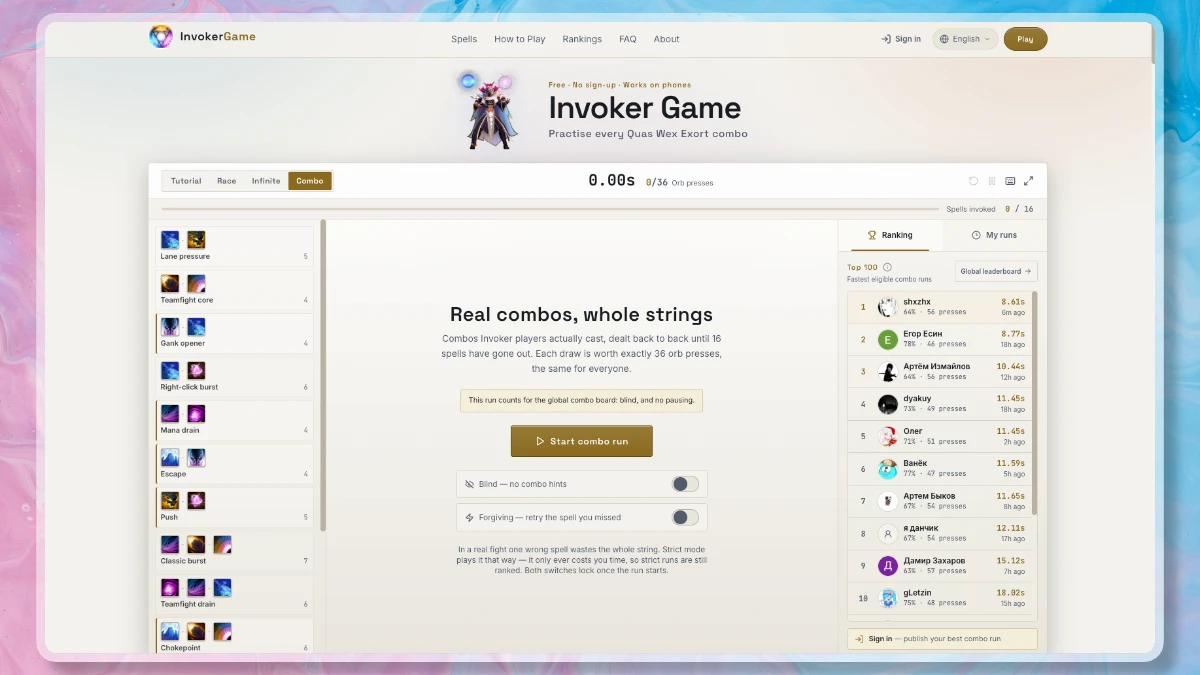
The race screen keeps the spell list, controls, timer and rankings visible without covering the practice area.
What Is Invoker Game?
Invoker Game is an unofficial fan-made trainer for Dota 2's Invoker. It is not a mod, overlay or replacement game client. The site does not need access to a Steam account, match history or local Dota installation.
The exercise is deliberately narrow: read a target spell, fill the three-position orb queue with Quas, Wex and Exort, then press Invoke. A correct recipe advances to the next target. A wrong invoke gives immediate feedback and leaves the queue available so you can correct it.
That tight loop is useful because recipe recall is a specific form of muscle memory. A player can understand what Chaos Meteor does and still lose time remembering that its recipe is Wex, Exort, Exort. Short repetitions remove that pause before the player returns to the much harder work of positioning, timing and target selection in a real match.
Four Practice Modes
The site divides practice into four modes rather than forcing every player through the same timed drill.
Tutorial
Tutorial presents all ten spells in a fixed progression. It begins with the three single-orb recipes, moves into two-orb combinations and finishes with Deafening Blast, the only recipe that uses all three orb types. The recipe stays visible and there is no score, so accuracy can come before speed.
Race
Race shuffles all ten spells, gives a three-second countdown and stops the clock after the final successful invoke. Combo hints can be hidden when the recipes are familiar. Results include time, accuracy, mistakes and the fastest individual spell, which makes repeated runs easy to compare.
Infinite
Infinite mode removes both the finish line and the score. Random targets continue until the player stops, making it the least distracting option for warm-ups, rebuilding rusty recall or fitting a few repetitions between matches.
Combo
Combo mode changes the task from recalling one icon at a time to executing complete spell strings. It draws from sequences used by Invoker players and shows every spell before the clock starts, so the result measures execution rather than reaction to a surprise prompt.
It also rewards efficient orb reuse. For example, moving from Tornado (QWW) to E.M.P. (WWW) only requires one new Wex press when the queue is managed correctly. The mode compares the player's orb presses with the minimum needed for the run, turning clean queue management into a visible efficiency score.
How the Orb Queue Works
The trainer follows Invoker's central recipe rule: the queue holds three orbs, and a fourth press pushes out the oldest one. Pressing Invoke resolves the three-orb combination currently in that queue.
Orb order does not change the resulting spell. QQW, QWQ and WQQ all contain two Quas orbs and one Wex orb, so each combination resolves to Ghost Walk. What matters is the multiset of three orbs, not their left-to-right order.
The ten recipes covered by the trainer are:
| Spell | Recipe |
|---|---|
| Cold Snap | QQQ |
| E.M.P. | WWW |
| Sun Strike | EEE |
| Ghost Walk | QQW |
| Ice Wall | QQE |
| Tornado | QWW |
| Alacrity | WWE |
| Forge Spirit | QEE |
| Chaos Meteor | WEE |
| Deafening Blast | QWE |
Memorising this table is a start, but the trainer is most useful when the letters stop feeling like a lookup table and become a physical movement.
Useful Practice Features
Several small choices keep the tool practical for repeat sessions:
- Custom keybinds: Quas, Wex, Exort and Invoke can match the player's Dota layout. The trainer stores physical key positions, which also makes the controls consistent across different keyboard languages.
- Keyboard and touch controls: Desktop players can train with keys, while the large on-screen controls let the same exercises run on a phone or tablet.
- Local records: Race and combo results can stay in browser storage without signing in. Clearing the site's browser data also clears those local records.
- Optional global rankings: Signed-in players can publish an eligible personal best. Global race and combo boards accept blind runs completed without pausing, keeping hinted practice separate from comparable scores.
- Pause rules: A paused race hides the target spell. The run can continue locally, but it no longer qualifies for the global ranking.
The separation between private practice and public competition is sensible: beginners can leave recipes visible and make mistakes without treating every session as a performance, while experienced players still have a controlled challenge to chase.
A Simple Training Routine
A productive first session does not need to be long:
- Complete Tutorial slowly and say each recipe aloud before pressing the keys.
- Repeat Tutorial until all ten spells can be invoked without a wrong attempt.
- Start Race with combo hints visible and focus on smooth transitions rather than the clock.
- Hide the hints once recall feels automatic, then use the same keybinds as in Dota 2.
- Move to Combo mode to practise whole sequences and reduce wasted orb presses.
- Use Infinite mode for a short warm-up before queueing for a match.
Speed is a useful measurement only after the recipes are stable. Repeating a confused movement faster tends to reinforce the confusion; a clean slow run creates something worth accelerating.
Who Should Try It?
New Invoker players get the clearest benefit because Tutorial removes lane pressure and teaches the recipes in a manageable order. Returning players can use Infinite or Race to restore recall after time away from the hero. More experienced players can use Combo mode to sharpen full strings and expose inefficient orb transitions.
The trainer cannot reproduce cooldown management, two-spell slots, enemy movement or the decisions that define a real team fight. It does not try to. Its value is in isolating one mechanical layer until that layer consumes less attention in the match itself.
To try a tutorial, a timed ten-spell race or a complete combo run, open invokergame.org and choose a mode. No installation is required.
Frequently asked questions
Is Invoker Game free?
Yes. The trainer is free to play in a browser. You can use the practice modes and keep local records without creating an account.
Do I need to install Dota 2 first?
No. Invoker Game runs independently in the browser and does not connect to the Dota 2 client, read match history or change in-game settings.
Does Invoker Game work on mobile?
Yes. Its orb and Invoke controls support touch input, although keyboard practice transfers more directly to playing Invoker on a computer.
Can I use my own Invoker keybinds?
Yes. Quas, Wex, Exort and Invoke can be rebound in the trainer, and the selected physical key positions are saved in that browser.
Do I need an account for the leaderboard?
Local results do not require an account. Optional sign-in is only needed to publish eligible blind, unpaused personal bests to the global boards.